> ## Documentation Index
> Fetch the complete documentation index at: https://hyperframes.heygen.com/llms.txt
> Use this file to discover all available pages before exploring further.

# Work on a project in Studio

> Open a HyperFrames project, understand the workspace, make a safe edit, and finish a version.

export const DocsVideo = ({src, poster, title, autoPlay = false, loop = false, portrait = false}) => {
  const videoRef = useRef(null);
  const playerRef = useRef(null);
  const hideTimerRef = useRef(null);
  const progressFrameRef = useRef(null);
  const [enhanced, setEnhanced] = useState(false);
  const [playing, setPlaying] = useState(false);
  const [waiting, setWaiting] = useState(false);
  const [muted, setMuted] = useState(false);
  const [currentTime, setCurrentTime] = useState(0);
  const [duration, setDuration] = useState(0);
  const [playbackRate, setPlaybackRate] = useState(1);
  const [controlsVisible, setControlsVisible] = useState(false);
  const [fullscreen, setFullscreen] = useState(false);
  const [fullscreenSupported, setFullscreenSupported] = useState(false);
  const [previewing, setPreviewing] = useState(false);
  const [scrubbing, setScrubbing] = useState(false);
  const [previewTime, setPreviewTime] = useState(0);
  const [previewPosition, setPreviewPosition] = useState(0);
  const formatTime = seconds => {
    if (!Number.isFinite(seconds) || seconds < 0) return "0:00";
    const minutes = Math.floor(seconds / 60);
    const remaining = Math.floor(seconds % 60);
    return `${minutes}:${String(remaining).padStart(2, "0")}`;
  };
  const clearHideTimer = () => {
    if (hideTimerRef.current) {
      window.clearTimeout(hideTimerRef.current);
      hideTimerRef.current = null;
    }
  };
  const revealControls = () => {
    setControlsVisible(true);
    clearHideTimer();
    hideTimerRef.current = window.setTimeout(() => setControlsVisible(false), 2200);
  };
  const togglePlayback = async () => {
    const video = videoRef.current;
    if (!video) return;
    if (video.paused || video.ended) {
      if (video.ended) video.currentTime = 0;
      setWaiting(true);
      try {
        await video.play();
      } catch {
        setWaiting(false);
        setPlaying(false);
      }
    } else {
      video.pause();
      setControlsVisible(true);
    }
  };
  const toggleMute = () => {
    const video = videoRef.current;
    if (!video) return;
    if (video.muted && video.volume === 0) video.volume = 0.8;
    video.muted = !video.muted;
    setMuted(video.muted);
  };
  const seek = event => {
    const video = videoRef.current;
    if (!video) return;
    const nextTime = Number(event.target.value);
    video.currentTime = nextTime;
    setCurrentTime(nextTime);
  };
  const updateScrubPreview = (event, seekMainVideo = false) => {
    if (!duration) return;
    const rect = event.currentTarget.getBoundingClientRect();
    const ratio = Math.min(1, Math.max(0, (event.clientX - rect.left) / rect.width));
    const nextTime = ratio * duration;
    setPreviewing(true);
    setPreviewTime(nextTime);
    setPreviewPosition(ratio * 100);
    if (seekMainVideo) {
      const video = videoRef.current;
      if (video) {
        video.currentTime = nextTime;
        setCurrentTime(nextTime);
      }
    }
  };
  const cyclePlaybackRate = () => {
    const video = videoRef.current;
    if (!video) return;
    const rates = [1, 1.25, 1.5, 2];
    const currentIndex = rates.indexOf(video.playbackRate);
    const nextRate = rates[(currentIndex + 1) % rates.length];
    video.playbackRate = nextRate;
    setPlaybackRate(nextRate);
  };
  const toggleFullscreen = async () => {
    const player = playerRef.current;
    const video = videoRef.current;
    if (!player || typeof document === "undefined") return;
    try {
      if (document.fullscreenElement) {
        await document.exitFullscreen();
      } else if (player.requestFullscreen) {
        await player.requestFullscreen();
      } else if (video?.webkitEnterFullscreen) {
        video.webkitEnterFullscreen();
      }
    } catch {}
  };
  const handleKeyboard = event => {
    if (event.target !== event.currentTarget) return;
    const video = videoRef.current;
    if (!video) return;
    if (event.key === " " || event.key === "Enter") {
      event.preventDefault();
      togglePlayback();
    } else if (event.key === "ArrowLeft") {
      event.preventDefault();
      video.currentTime = Math.max(0, video.currentTime - 5);
    } else if (event.key === "ArrowRight") {
      event.preventDefault();
      video.currentTime = Math.min(duration || video.duration || 0, video.currentTime + 5);
    } else if (event.key.toLowerCase() === "m") {
      event.preventDefault();
      toggleMute();
    } else if (event.key.toLowerCase() === "f") {
      event.preventDefault();
      toggleFullscreen();
    }
  };
  useEffect(() => {
    setEnhanced(true);
    setFullscreenSupported(Boolean(playerRef.current?.requestFullscreen || videoRef.current?.webkitEnterFullscreen));
    return () => {
      clearHideTimer();
    };
  }, []);
  useEffect(() => {
    if (typeof document === "undefined") return undefined;
    const syncFullscreen = () => setFullscreen(document.fullscreenElement === playerRef.current);
    document.addEventListener("fullscreenchange", syncFullscreen);
    return () => document.removeEventListener("fullscreenchange", syncFullscreen);
  }, []);
  useEffect(() => {
    clearHideTimer();
    if (!playing) return undefined;
    hideTimerRef.current = window.setTimeout(() => setControlsVisible(false), 2200);
    return clearHideTimer;
  }, [playing]);
  useEffect(() => {
    if (!playing) return undefined;
    const updateProgress = () => {
      const video = videoRef.current;
      if (video && !video.paused) setCurrentTime(video.currentTime);
      progressFrameRef.current = window.requestAnimationFrame(updateProgress);
    };
    progressFrameRef.current = window.requestAnimationFrame(updateProgress);
    return () => {
      if (progressFrameRef.current) window.cancelAnimationFrame(progressFrameRef.current);
      progressFrameRef.current = null;
    };
  }, [playing]);
  const progress = duration > 0 ? currentTime / duration * 100 : 0;
  const replaying = duration > 0 && currentTime >= duration - 0.15;
  return <div className="hf-docs-video-block" data-portrait={portrait ? "true" : "false"}>
      <div ref={playerRef} className="hf-docs-video" role="region" aria-label={title} tabIndex={0} onKeyDown={handleKeyboard} onPointerMove={revealControls} onPointerLeave={() => setControlsVisible(false)} onFocus={revealControls} onBlur={event => {
    if (!event.currentTarget.contains(event.relatedTarget)) setControlsVisible(false);
  }}>
        <video ref={videoRef} aria-label={title} src={src} poster={poster} autoPlay={autoPlay} loop={loop} playsInline preload="metadata" controls={!enhanced} onClick={togglePlayback} onDoubleClick={toggleFullscreen} onLoadedMetadata={event => {
    const nextDuration = event.currentTarget.duration || 0;
    setDuration(nextDuration);
    setMuted(event.currentTarget.muted);
  }} onDurationChange={event => setDuration(event.currentTarget.duration || 0)} onTimeUpdate={event => setCurrentTime(event.currentTarget.currentTime)} onPlay={() => setPlaying(true)} onPause={() => setPlaying(false)} onPlaying={() => setWaiting(false)} onWaiting={() => setWaiting(true)} onCanPlay={() => setWaiting(false)} onEnded={() => {
    setPlaying(false);
    setControlsVisible(true);
  }} onVolumeChange={event => setMuted(event.currentTarget.muted)} />

        {enhanced && <>
            {!playing && (currentTime <= 0.2 || replaying) && <button type="button" className="hf-docs-video-hero-play" onClick={togglePlayback} aria-label={replaying ? "Replay video" : "Play video"}>
                <span className="hf-docs-video-hero-icon" aria-hidden="true">
                  <svg viewBox="0 0 24 24">
                    <path d="M8 5.5v13l10-6.5z" />
                  </svg>
                </span>
              </button>}

            {waiting && playing && <span className="hf-docs-video-spinner" aria-label="Loading" />}

            <div className="hf-docs-video-controls" data-visible={controlsVisible ? "true" : "false"}>
              <div className="hf-docs-video-scrub-preview" data-visible={previewing ? "true" : "false"} style={{
    "--hf-video-preview-x": `${previewPosition}%`
  }} aria-hidden="true">
                <span>{formatTime(previewTime)}</span>
              </div>

              <input className="hf-docs-video-progress" type="range" min="0" max={duration || 0} step="0.01" value={Math.min(currentTime, duration || 0)} aria-label="Video progress" aria-valuetext={`${formatTime(currentTime)} of ${formatTime(duration)}`} onChange={seek} onPointerEnter={updateScrubPreview} onPointerMove={event => updateScrubPreview(event, scrubbing || event.buttons === 1)} onPointerDown={event => {
    setScrubbing(true);
    event.currentTarget.setPointerCapture?.(event.pointerId);
    updateScrubPreview(event, true);
  }} onPointerUp={event => {
    setScrubbing(false);
    if (event.pointerType !== "mouse") setPreviewing(false);
  }} onPointerCancel={() => {
    setScrubbing(false);
    setPreviewing(false);
  }} onPointerLeave={() => {
    if (!scrubbing) setPreviewing(false);
  }} style={{
    "--hf-video-progress": `${progress}%`
  }} />

              <div className="hf-docs-video-control-row">
                <button type="button" className="hf-docs-video-control" onClick={togglePlayback} aria-label={playing ? "Pause video" : "Play video"}>
                  {playing ? <svg viewBox="0 0 24 24" aria-hidden="true">
                      <path d="M7 5h4v14H7zm6 0h4v14h-4z" />
                    </svg> : <svg viewBox="0 0 24 24" aria-hidden="true">
                      <path d="M8 5.5v13l10-6.5z" />
                    </svg>}
                </button>

                <button type="button" className="hf-docs-video-control" onClick={toggleMute} aria-label={muted ? "Unmute video" : "Mute video"}>
                  {muted ? <svg viewBox="0 0 24 24" aria-hidden="true">
                      <path d="M4 9v6h4l5 4V5L8 9zm11.5 1.1 1.4-1.4 1.6 1.6 1.6-1.6 1.4 1.4-1.6 1.6 1.6 1.6-1.4 1.4-1.6-1.6-1.6 1.6-1.4-1.4 1.6-1.6z" />
                    </svg> : <svg viewBox="0 0 24 24" aria-hidden="true">
                      <path d="M4 9v6h4l5 4V5L8 9zm11 1.2v3.6c1-.5 1.7-1.5 1.7-2.8S16 10.7 15 10.2zm0-4v2.1c2.2.6 3.7 2.5 3.7 4.7s-1.5 4.1-3.7 4.7v2.1c3.3-.7 5.7-3.5 5.7-6.8S18.3 6.9 15 6.2z" />
                    </svg>}
                </button>

                <span className="hf-docs-video-time" aria-hidden="true">
                  {formatTime(currentTime)} <span>/</span> {formatTime(duration)}
                </span>

                <span className="hf-docs-video-spacer" />

                <button type="button" className="hf-docs-video-rate" onClick={cyclePlaybackRate} aria-label={`Playback speed ${playbackRate} times`}>
                  {playbackRate}×
                </button>

                {fullscreenSupported && <button type="button" className="hf-docs-video-control" onClick={toggleFullscreen} aria-label={fullscreen ? "Exit fullscreen" : "Enter fullscreen"}>
                    {fullscreen ? <svg viewBox="0 0 24 24" aria-hidden="true">
                        <path d="M8 3H6v3H3v2h5zm8 0v5h5V6h-3V3zM3 16v2h3v3h2v-5zm13 0v5h2v-3h3v-2z" />
                      </svg> : <svg viewBox="0 0 24 24" aria-hidden="true">
                        <path d="M3 8h2V5h3V3H3zm13-5v2h3v3h2V3zM5 16H3v5h5v-2H5zm14 3h-3v2h5v-5h-2z" />
                      </svg>}
                  </button>}
              </div>
            </div>
          </>}
      </div>

    </div>;
};

<div className="hf-docs-video-frame">
  <DocsVideo title="A narrated tour of a real HyperFrames Studio project" src="https://static.heygen.ai/hyperframes-oss/docs/images/showcase/studio-front-door-v2.mp4" poster="https://static.heygen.ai/hyperframes-oss/docs/images/showcase/studio-front-door-v2.jpg" />
</div>

Studio is the visual editor for the same HTML project your agent and the CLI
use. The Reference Project from the first-video guide opens here without an
import or conversion. Open any project folder, then run:

```bash theme={null}
npx hyperframes preview
```

## Know the workspace

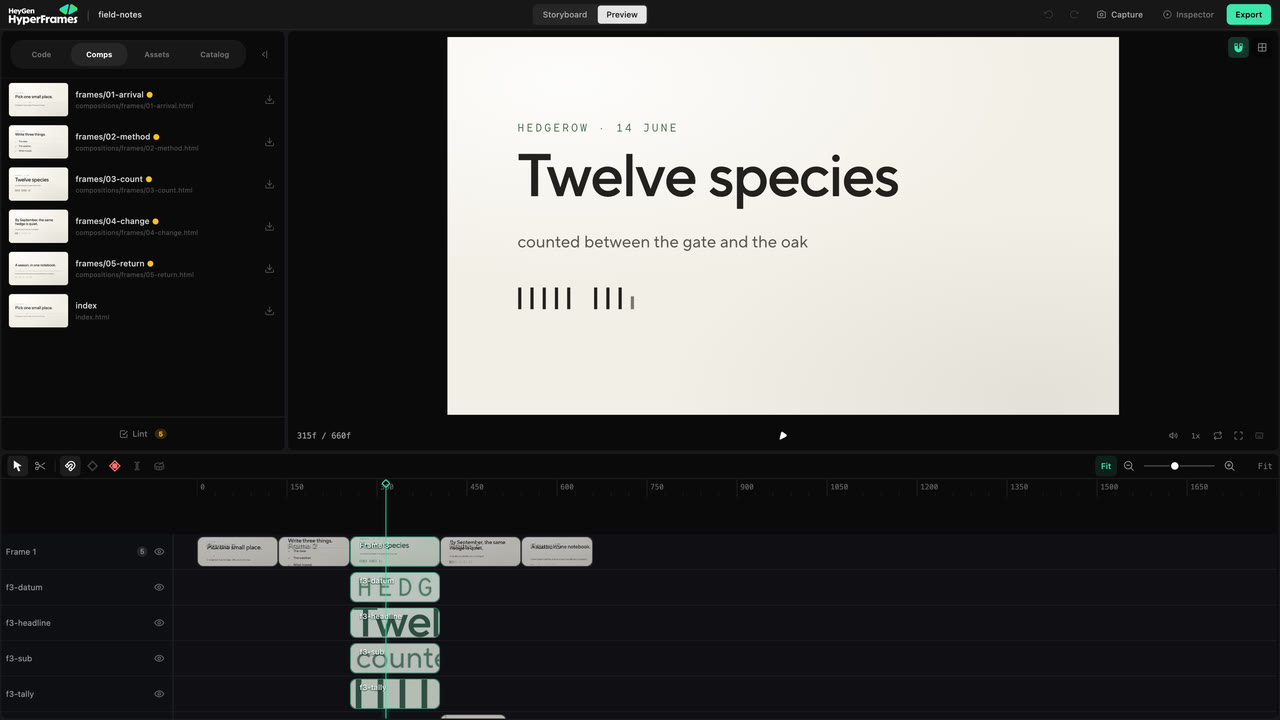
<Frame caption="Preview keeps project files, the live frame, the Inspector, and time-based editing in one workspace.">
  <img src="https://static.heygen.ai/hyperframes-oss/docs/images/studio/overview-v1.jpg" alt="HyperFrames Studio Preview showing project tools, a live composition, the Inspector, and the timeline" />
</Frame>

* **Storyboard** shows the planned sequence, direction, voiceover, status, and
  comments. Use it to review the story.
* **Preview** shows the built project. The live frame is in the middle, the
  timeline is below, project tools are on the left, and the Inspector is on the
  right.
* **Code**, **Comps**, **Assets**, and **Catalog** expose the project source,
  compositions, media, and reusable visuals. **Design**, **Layers**,
  **Variables**, and **Renders** control the selected work.

You do not need to learn every panel. Choose the surface that matches the
problem in front of you.

| You want to change                              | Start with                       |
| ----------------------------------------------- | -------------------------------- |
| Something visible in the current frame          | Canvas, then Design or Layers    |
| When something appears or how long it stays     | Timeline                         |
| One movement or transition                      | Animation controls and keyframes |
| The story, several scenes, or project structure | Your agent                       |

## Make one safe edit

Pause where the problem is visible. Click the element on the canvas, or choose
it in **Layers** when several elements overlap. Then change only the property
you meant to change.

<div style={{ maxWidth: "42rem", margin: "1.5rem auto" }}>
  <Frame caption="The canvas selects the visible element; Design exposes the properties Studio can edit safely.">
    <video src="https://static.heygen.ai/hyperframes-oss/docs/images/showcase/studio-direct-edit-loop-v2.mp4" poster="https://static.heygen.ai/hyperframes-oss/docs/images/showcase/studio-direct-edit-loop-v2.jpg" alt="Selecting an element and changing it in HyperFrames Studio" aria-label="Selecting an element and changing it in HyperFrames Studio" autoPlay muted loop playsInline preload="metadata" />
  </Frame>
</div>

Use the canvas to move, resize, rotate, or crop a supported element. Use
**Design** for text, layout, style, media, motion, 3D, or color controls that
apply to the selection. Play through the surrounding moment before accepting
the change; a correct still frame can still create a collision in motion.

<Warning>
  Auto-keyframe starts enabled. Turn it off before a normal layout correction that should stay
  constant. Leave it on only when the change at the current playhead time should become animation.
</Warning>

For the complete visible-edit workflow, continue to [Edit the
frame](/studio/canvas).

## Change time on the timeline

Drag a clip to move it earlier or later. Drag an edge to change its duration.
Use the razor only when one supported clip must become two.

<div style={{ maxWidth: "42rem", margin: "1.5rem auto" }}>
  <Frame caption="Timing changes stay visible beside the frame and neighboring tracks.">
    <video src="https://static.heygen.ai/hyperframes-oss/docs/images/showcase/studio-timing-loop-v2.mp4" poster="https://static.heygen.ai/hyperframes-oss/docs/images/showcase/studio-timing-loop-v2.jpg" alt="Adjusting clip timing in the HyperFrames Studio timeline" aria-label="Adjusting clip timing in the HyperFrames Studio timeline" autoPlay muted loop playsInline preload="metadata" />
  </Frame>
</div>

Move the playhead through the surrounding cut after every timing change. Use
[the timeline guide](/studio/timeline) when you need trimming, splitting,
beats, nested scenes, or multi-item editing.

## Hand a broader change back to the agent

Studio is best for a change you can point at. Ask the agent when the request
affects the story, several scenes, source research, or unfamiliar project code.

Use **Ask agent** or **Copy to Agent** when Studio offers it, then add the human
intent that the copied context cannot know:

```text theme={null}
Make the opening feel faster, but keep the current narration and final scene.
```

The agent and Studio edit the same source. There is no export or conversion
between them.

## Check and render the version

Watch the project from the beginning, run **Lint**, and fix the reported issues.
Before delivery, run the project-level browser gate as well:

```bash theme={null}
npx hyperframes check
```

Then render through Studio, your agent, or the CLI. Open the exported file and
watch it once before sharing it.

<div style={{ maxWidth: "42rem", margin: "1.5rem auto" }}>
  <Frame caption="Studio queues and monitors a render from the same project.">
    <video src="https://static.heygen.ai/hyperframes-oss/docs/images/showcase/studio-check-render-loop-v2.mp4" poster="https://static.heygen.ai/hyperframes-oss/docs/images/showcase/studio-check-render-loop-v2.jpg" alt="Queuing and monitoring a render in HyperFrames Studio" aria-label="Queuing and monitoring a render in HyperFrames Studio" autoPlay muted loop playsInline preload="metadata" />
  </Frame>
</div>

## Related topics

<CardGroup cols={2}>
  <Card title="Edit the frame" icon="crop" href="/studio/canvas">
    Select, style, arrange, group, and replace visible elements.
  </Card>

  <Card title="Edit timing" icon="timeline" href="/studio/timeline">
    Trim, split, move, and retime clips on the project timeline.
  </Card>

  <Card title="Finish and share" icon="circle-check" href="/guides/export-and-share">
    Review, validate, render, and deliver the project.
  </Card>
</CardGroup>


## Related topics

- [How a HyperFrames project works](/concepts/index.md)
- [HyperFrames or Remotion?](/guides/hyperframes-vs-remotion.md)
- [@hyperframes/studio](/packages/studio.md)