> ## Documentation Index
> Fetch the complete documentation index at: https://hyperframes.heygen.com/llms.txt
> Use this file to discover all available pages before exploring further.
# Use variables and templates
> Turn a visible value into a reusable input, preview variants, and hand the template off.
Variables let one project produce many versions without rebuilding its layout or animation.
 ## Create one reusable input
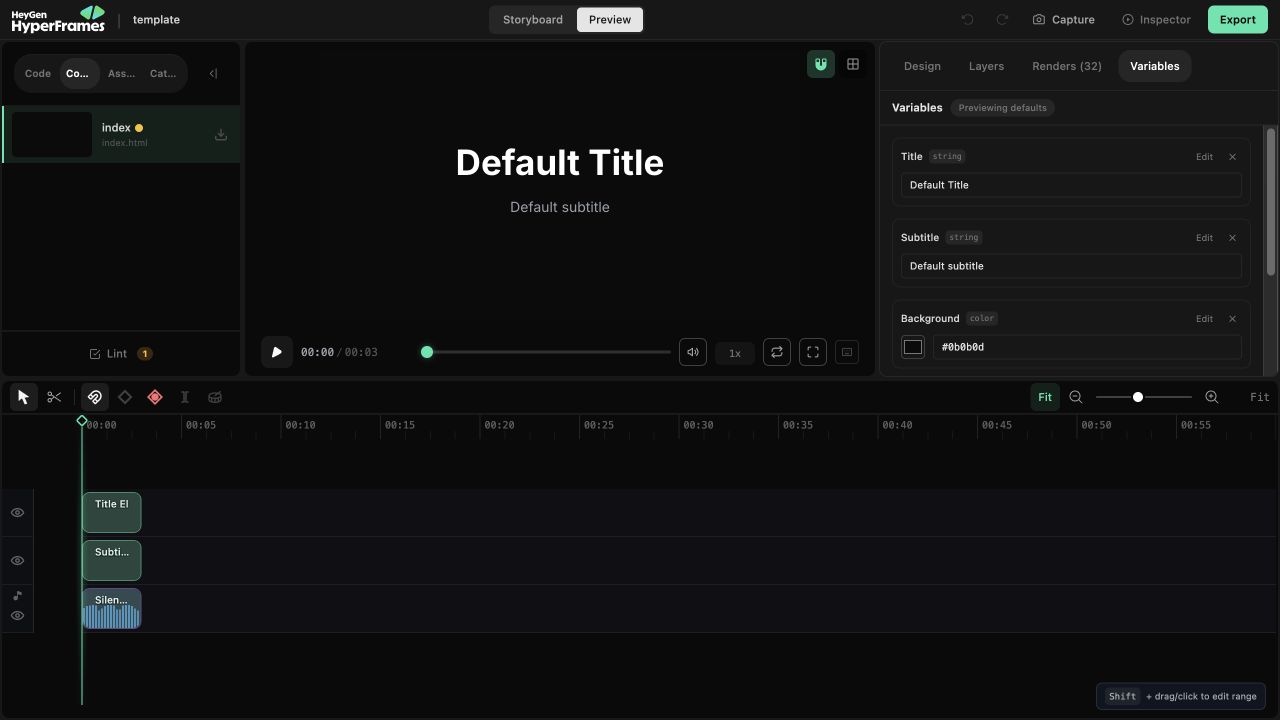
The quickest path starts from the canvas:
1. Select the element.
2. Open **Variables** in the right panel.
3. Bind the text, media source, text color, background, or font property.
4. Create a new variable or choose a compatible existing one.
For a value that is not tied to the selected element, click **Add variable**. Studio supports string, number, color, boolean, enum, font, and image variables. Number variables can include minimum, maximum, and step values; enums can define their allowed options.
Name the input by meaning—`customerName`, `headline`, or `brandColor`—rather than by its position in the design.
## Preview without changing the template
Change a value in the Variables panel to preview that version immediately. The preview is an override: it does not replace the saved default.
The panel tells you whether you are previewing defaults or custom values. Use **Reset** to clear all preview overrides. When a scalar preview should become the new default, use **Set default**.
Variables from other compositions are listed separately. You can edit their declarations, but
their values are not live-previewed in the active composition.
## Hand the project off
At the bottom of the panel, **Use this template** can copy either:
* the effective values as JSON;
* a ready-to-run `npx hyperframes render ... --variables ...` command.
This keeps the values you just reviewed attached to the render request instead of asking the next person to reconstruct them.
## Test the fallback
A useful template survives realistic variation. Before handing it off, test:
* long and short names or headlines;
* image aspect ratios;
* color contrast;
* number formatting;
* missing optional values.
For the schema, HTML bindings, and batch-render examples, read [Variables](/concepts/variables).
## Related topics
* [Understand the variables contract](/concepts/variables)
* [Use Assets and Catalog](/studio/assets-and-blocks)
* [Render variable-driven versions](/guides/rendering#batch-and-cloud-work)
## Related topics
- [Reuse a design with variables](/concepts/variables.md)
- [Cloud rendering](/deploy/cloud.md)
- [Variables and templating](/prompting/variables-and-templating.md)
## Create one reusable input
The quickest path starts from the canvas:
1. Select the element.
2. Open **Variables** in the right panel.
3. Bind the text, media source, text color, background, or font property.
4. Create a new variable or choose a compatible existing one.
For a value that is not tied to the selected element, click **Add variable**. Studio supports string, number, color, boolean, enum, font, and image variables. Number variables can include minimum, maximum, and step values; enums can define their allowed options.
Name the input by meaning—`customerName`, `headline`, or `brandColor`—rather than by its position in the design.
## Preview without changing the template
Change a value in the Variables panel to preview that version immediately. The preview is an override: it does not replace the saved default.
The panel tells you whether you are previewing defaults or custom values. Use **Reset** to clear all preview overrides. When a scalar preview should become the new default, use **Set default**.
Variables from other compositions are listed separately. You can edit their declarations, but
their values are not live-previewed in the active composition.
## Hand the project off
At the bottom of the panel, **Use this template** can copy either:
* the effective values as JSON;
* a ready-to-run `npx hyperframes render ... --variables ...` command.
This keeps the values you just reviewed attached to the render request instead of asking the next person to reconstruct them.
## Test the fallback
A useful template survives realistic variation. Before handing it off, test:
* long and short names or headlines;
* image aspect ratios;
* color contrast;
* number formatting;
* missing optional values.
For the schema, HTML bindings, and batch-render examples, read [Variables](/concepts/variables).
## Related topics
* [Understand the variables contract](/concepts/variables)
* [Use Assets and Catalog](/studio/assets-and-blocks)
* [Render variable-driven versions](/guides/rendering#batch-and-cloud-work)
## Related topics
- [Reuse a design with variables](/concepts/variables.md)
- [Cloud rendering](/deploy/cloud.md)
- [Variables and templating](/prompting/variables-and-templating.md)